When the buyer is an AI agent: the B2B rules it must respect
A buyer at a customer's depot opens their AI assistant and types: "Reorder last month's order for the Hamburg depot, in boxes, and send it for approval." The agent finds the order, fills the cart, and gets it ready for sign-off.
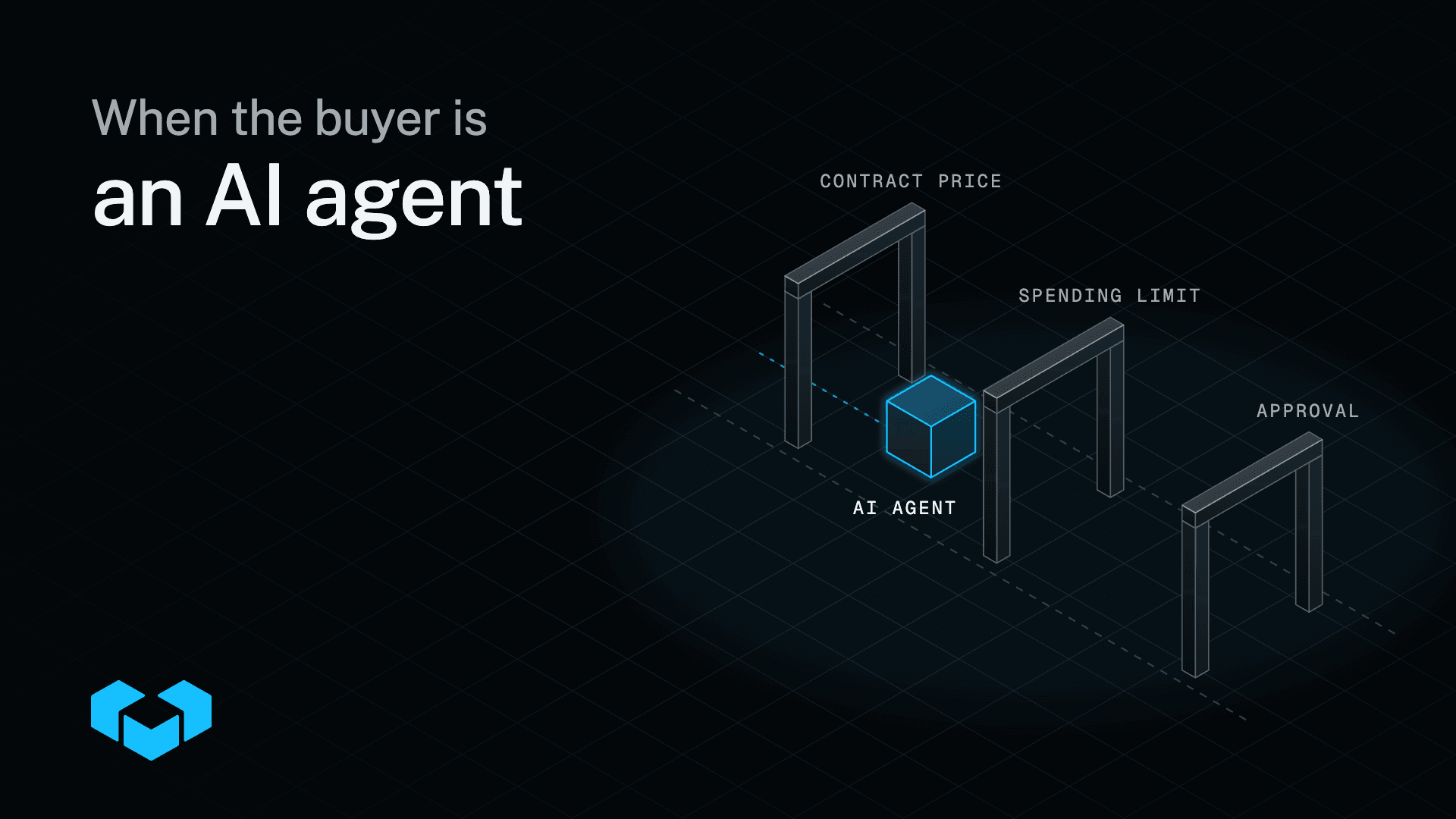
In B2B, the rules for that order were agreed long before the agent arrived. The buyer orders for a company, at prices from a contract, up to a limit, and anything over that limit goes to a manager. The agent has to follow the same rules as the person it acts for, on every order.
This guide is for teams that run B2B commerce and expect their customers' buyers to start ordering through an AI assistant, whether that is Claude, ChatGPT, or any other assistant they use. It covers the five rules an agent must respect, why those rules have to live in the commerce platform, and how Vendure applies them. In Vendure, B2B comes built in, so an agent gets the same rules as the buyer it acts for.
The short answer
An AI agent that buys for a company has to respect five rules: which account it uses, the company's agreed prices, the buyer's spending limit, who signs off, and what gets recorded.
Those rules only hold if the commerce platform the agent uses is set up to apply them. You don't control your customers' assistants or what their prompts say, so the platform has to apply the same rules to every order, whether a person or an agent places it.
Why B2B buying is harder for an agent
A consumer agent buys for one person, at the public price, and pays by card. B2B buying is different on each count:
- The buyer orders for a company, with a role and often for one branch.
- The price comes from a contract, with dates when it starts and stops.
- Orders over the buyer's limit wait for a manager to approve them.
- Large orders start as a quote.
- Finance wants to know who did what, and when.
An agent that misses one of these creates an order the customer's finance team rejects, or one at a price your sales team never agreed. A person usually notices when a price looks wrong. An agent usually does not, so the platform has to get it right.
Five B2B rules an AI agent must respect
1. Which account it uses
The agent acts as one signed-in buyer, with that buyer's permissions and nothing more. A customer approves their assistant once, on a consent page in your storefront, and can revoke it from their account.
With company accounts, that buyer belongs to a company. The agent sees the company's addresses, payment methods, and order history, and no other customer's. With organization hierarchy, each branch or depot is its own business unit with its own buyers and permissions, so the agent for the Hamburg buyer orders for Hamburg.
2. The company's agreed prices
With contract pricing, each customer has its own price lists, and each list has the dates it starts and stops applying. Vendure works out the price for that customer. The agent sees the price the buyer would see in the storefront, and a customer's agent cannot set a price itself.
For a large order, the agent can request a quote instead. Your team responds, the buyer or their agent accepts it, and the buyer converts it into an order without retyping anything.
3. The buyer's spending limit
With order approvals, each customer gets spending limits and approvers. When an order is over the buyer's limit, the agent submits it for approval, and it waits for the right person to sign it off, like any other order over that limit.
Some teams call this a purchasing budget. In Vendure it is a spending limit on the approval policy, set per customer.
4. Who signs off
The approver approves, rejects, or asks for changes, from an email, the storefront, or their own assistant. A purchasing manager can ask their assistant "What is my team waiting on? Approve everything under €5,000," and the agent lists the waiting orders and decides on the small ones. Vendure marks a decision on an approval as destructive, so the agent asks the manager to confirm first.
Advanced approvals add chains with more than one level, timeouts, and delegation, for sign-offs a single step cannot express.
5. What gets recorded
Vendure logs every call that reaches a tool: which agent called which tool, when, and whether it worked. The audit log records supported admin and commerce events, with who changed what, and when, across the Dashboard and the API. When finance asks who changed a customer's price list last week, the record shows it, whether a person or an agent made the change.
| The rule | Built into Vendure |
|---|---|
| The agent orders for one company and its buyers | Company accounts |
| Large orders start as a quote | Quote requests |
| Each branch orders for itself | Organization hierarchy |
| The agent sees the agreed price | Contract pricing with dated price lists |
| Orders over a limit wait for sign-off | Order approvals |
| Every change has a record | Audit log |
| Approval chains with more than one level | Advanced approvals |
Ready to build? The Vendure docs cover architecture, setup, and extension from day one.
MCP quick startPut the rules in the platform
A B2B rule can live in one of three places: the agent's prompt, a tool around the platform, or the platform itself. Only the platform applies it to every agent.
Whoever runs the agent writes its prompt. Your customers will bring their own assistants, and you cannot see or change their instructions. An app or script around the platform covers only the orders that pass through it. If an approval happens in someone's inbox today, an agent ordering through the platform's API never reaches that inbox. Our guide to outgrowing B2B workarounds covers how those rules end up outside the platform in the first place.
In Vendure, agents connect through the MCP server. MCP is the open standard AI assistants use to find and call tools on a server. Every tool needs the same Vendure permissions as the API call behind it, so the rules that apply to a buyer in the storefront apply to their agent. Your team also keeps control of the agents themselves:
- Tools you switch off. Turn a tool off in the Dashboard and no agent can see it or call it.
- It asks first. Vendure marks placing an order, refunds, and cancellations as destructive, so the agent asks the person to confirm.
- Rate limits. Limits apply per session, user, and tool, and they are stricter on placing orders and refunds.
Why Vendure is built agent first
Our team builds Vendure with AI agents, the same coding agents the developers who build on Vendure use. That puts us in the seat of the people who buy Vendure, so we plan each feature for a person and for an agent using it, because both will.
You can see it in what we ship for developers. Since Vendure 3.7, new projects come with an AGENTS.md file, you can add Vendure skills to your coding agent, and CLI commands fail fast instead of waiting on a prompt when an agent or a CI job runs them. The Vendure docs have their own MCP server, and coding agents can report a missing example or an unclear page to our team while they work.
The store follows the same idea. The MCP server is part of Vendure from version 3.8, and 28 Vendure capabilities add their own agent tools, 172 in all. Company accounts, quotes, contract pricing, and order approvals each have tools an agent can call. When your customers' buyers start ordering through an agent, the rules in this guide already apply to it.
See an agent in action
Here's an example from the release of Vendure 3.8, where an agent on a Vendure demo store takes the request "I want to buy a camera". It searches the catalogue, compares three cameras, adds the one the shopper picks to the cart, and checks the shipping options. Every step is a call to the MCP server's shop tools, with the shopper's permissions.
The demo store sells to consumers. On a B2B store, the same agent also gets the buyer's company account, contract prices, and approval rules, because those come from the platform, too.
Complex B2B and B2C on one adaptable, headless ecommerce platform.
Build with AIWhat an agent order looks like on Vendure
Here is the reorder from the start of this guide, from a buyer at the Hamburg depot of one of your customers:
- The buyer asks. "Reorder last month's order for the Hamburg depot, in boxes, and send it for approval."
- The agent finds the order. It shows last month's order for Hamburg, at that customer's prices.
- It fills the cart in boxes. Packaging units sell the same product by the piece, box, or pallet.
- It sends the order for approval. The order is over the buyer's limit, so it waits for the manager.
- The manager decides. They decide from their own assistant, the email, or the storefront, and Vendure records who decided and when.
The Build with AI page shows this and five other B2B jobs, each as one request and the Vendure tools the agent calls.
The MCP server comes with 42 built-in tools, and each B2B capability adds its own, so an agent can work with every capability in the table above.
A checklist before agents order for your customers
- List the rules that live outside the platform. An agent will skip price spreadsheets, approval emails, and scripts that run after checkout.
- Make every buyer a named person in a company. An agent should act as one buyer, with that buyer's role, and never as a shared login.
- Move contract prices into the platform. Each customer's price list, with its start and end dates, should decide what the agent sees.
- Set spending limits and approvers per customer. An order over the limit should wait for a person, whoever placed it.
- Decide which tools agents may call. Switch off what you do not want agents to touch, and start with reading and reordering.
- Check the record. Make sure you can see which agent did what, and when, before your customers ask.
Worth reading, once a month
Product updates, customer stories, and engineering thinking, delivered monthly.
When you do not need this yet
If your customers buy at list prices, pay by card, and never need sign-off, the MCP server's shop tools may be all their agents need. Search, cart, and checkout work through the MCP server. The B2B rules matter once a customer has its own prices, a spending limit, or an approver, and that is the moment to put those rules in the platform.
The bottom line
AI agents will order the way your platform lets them. If the B2B rules live in prompts, inboxes, and scripts, an agent can go around them. With Vendure, B2B comes built in, for buyers and their agents. An agent buying for a company gets that company's account, prices, spending limits, and approvers, the same as the person it acts for. See what an agent can do in your store on Build with AI.
Frequently asked questions
Yes. Through the MCP server, an assistant such as Claude, ChatGPT, or any other MCP client acts for a signed-in buyer after the buyer approves it once in your storefront. It searches, fills the cart, and places or submits the order with that buyer's permissions, and it asks the buyer to confirm before it places an order.
A customer's agent sees the price Vendure works out for that customer from their contract price list, and cannot set a price. Changing a price list is an admin action that needs the same permissions as a person on your team, and the audit log records who changed what.
With order approvals, the agent submits the order for approval, and it waits for the approver set for that customer. The approver can approve, reject, or ask for changes, from an email, the storefront, or their own assistant.
Any MCP client that connects to a remote server by URL, for example Claude, ChatGPT, Cursor, Codex, and GitHub Copilot.
Nothing to start. To let their own assistant act for them, a buyer approves it once on a consent page in your storefront, and can revoke it from their account.
Share this guide
B2B comes built in, for buyers and their agents
Vendure is the complete, headless ecommerce platform for complex B2B. Replace fragile workarounds and fragmented stacks while keeping the systems your business already runs.
You may also like